
LicenseQ helps you secure the best terms for your Microsoft agreements, such as the Enterprise Agreement, CSP, or MCA-E.
Microsoft Licensing Update March 2026, incl. changes to Defender Portfolio, Teams and more

Author:
Jeroen Hidding
Jeroen entered Microsoft Licensing in 2008 at a Global LSP. Jeroen is specialized in optimizing complex Microsoft licensing requirements from a commercial perspective.
You are now reading:
Microsoft Licensing Update ... Microsoft Licensing Update March 2026, incl. changes to Defender Portfolio, Teams and more
Author:
Jeroen Hidding
Microsoft Sovereign Cloud Updates
Microsoft is evolving the Sovereign Cloud. The latest update introduces enhanced Governance, Productivity, and Support capabilities for large AI models that can operate securely, even in fully disconnected environments.
This is helpful in situations where being connected to the internet is not always possible or allowed due to confidential environments for example.
Want to learn more? Read the official Microsoft blog here.
Microsoft has introduced three major updates that are available effective immediately:
- Azure Local disconnected operations
- Microsoft 365 Local disconnected
- Foundry Local adds modern infrastructure capabilities and support for large AI models
If your organization requires additional data security, the Azure Local and Microsoft 365 Local services could be a suitable solution.
Teams Licensing Changes
Effective Date
As we notified you in our February newsletter, all changes take effect on 1 April 2026 for users with licenses that include calendar access in Outlook and Teams (e.g., Microsoft 365 E3/E5, Business plans, Exchange Online, and various Teams licenses).
1. Town Hall & Webinar Features Move to Teams Enterprise
All Teams Premium Town Hall and webinar features are now included in Teams Enterprise.
Newly included features in Teams Enterprise:
- Streaming chat
- Reactions in town halls/webinars
- Real-time event analytics
- Meeting theme & branded emails
- Enterprise CDN (eCDN)
- Immersive 3D events
Capacity updates:
- Host events up to 3,000 attendees
- View-only streaming up to 10,000 attendees
- New Attendee Pack add-ons available (5,000–100,000 attendees)
Impact: Large-scale event capabilities become standard within Teams Enterprise.
Attendee Packs introduce a scalable add-on model for very large broadcasts.
2. Microsoft Places – Broader Access Included
Microsoft is expanding access to end-user Microsoft Places functionality across all licenses that include Outlook/Teams calendar access.
Newly included capabilities:
- Places Finder (replacing Room Finder)
- Rich booking experience with images, floorplans, space attributes, and technology details
- New event calendaring experience integrated with Places Finder
- Places Explorer
- Map-based workspace reservations
- Visibility into co-workers, spaces, and workplace activity
Impact: Organizations can deploy enhanced workplace coordination tools at scale without requiring additional licensing for standard users.
3. Teams Shared Devices renamed to “Teams Shared Space” License
The Teams Shared Devices license is renamed to Teams Shared Space and expanded.
Key changes:
- One license can now manage up to four desks
- Continues to support shared devices, panels, rooms, and hot-desking setups
- Adds desk booking and workspace management capabilities
- Includes Space Analytics (inventory & utilization reporting)
Impact: Improved centralized management of desks and shared spaces.
No action required for existing license holders, but additional no-cost license assignment is required to utilize the expanded 4-desk capacity.
4. Teams Premium Still Required For:
Despite these shifts, Teams Premium remains required for:
- Advanced meeting protection
- Intelligent recap
- Advanced collaboration tools for admins
- Queues app for Teams Phone
- Enhanced Bookings & virtual appointments
Overall Impact
Microsoft is:
- Expanding baseline collaboration capabilities
- Simplifying access to workplace coordination tools
- Shifting large-scale event functionality into Teams Enterprise
- Introducing scalable add-on licensing for very large events
From a licensing perspective, this represents a value expansion within existing suites, with monetization focused on large-event scalability rather than feature gating.
Defender portfolio – New Services Added
Many Microsoft customers currently use the Microsoft Defender Suite (formerly known as the Microsoft 365 E5 Security Suite). As part of the broader Microsoft 365 E5 offering, customers rely on the advanced security capabilities included within the Defender portfolio.
Microsoft has now introduced the Microsoft Defender Experts Suite, designed for customers seeking a fully managed Extended Detection and Response (MXDR) service.
The Defender for Experts Suite bundles three offerings:
- Microsoft Defender Experts for XDR for continual security alert management
- Microsoft Incident Response for cyberattack handling
- Microsoft Enhanced Designated Engineering for long-term security optimization
Microsoft introduced two plans. Plan 1 includes the abovementioned three offerings, whereas Plan 2 includes more pro-active support from Microsoft for your Security environment.
For more information visit the Microsoft Security Experts page here.
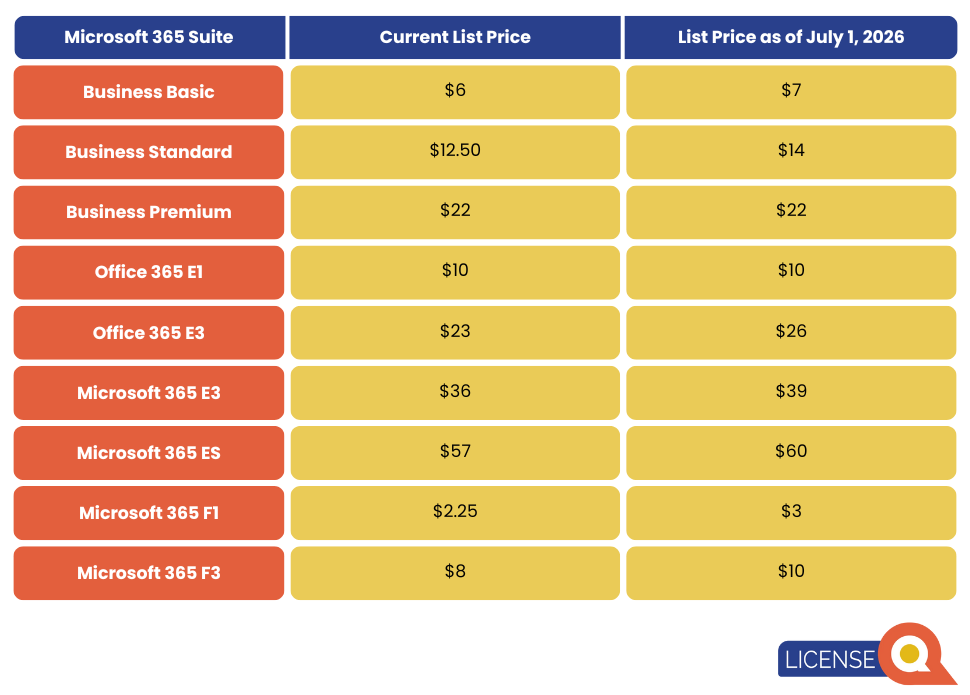
Reminder: Microsoft Price & Suite Updates Starting 1 July 2026
Since February, Microsoft has reduced subscription prices in euros to align with foreign exchange (FX) rate adjustments.
These adjusted prices will remain in effect until 1 July 2026, after which pricing will increase again. From that date, Microsoft will also introduce additional functionality across various suites for both new and existing customers.
Why does it matter? If you start a new subscription before 1 July 2026 this gives you the opportunity to profit from the lower Microsoft pricing for as long as possible while also benefitting from suites upgrades.
More information on M365 Packaging pricing updates here.
Microsoft 365 Price Increase 1 July 2026

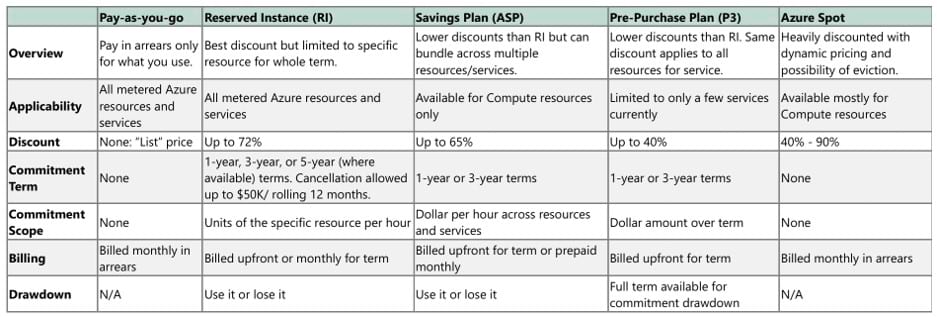
Azure Purchasing Models Overview
Azure offers several purchasing models, each with its own pricing structure, contractual framework, and optimization opportunities. Understanding these differences is important when determining the most suitable approach for your organization. The overview below summarizes the most common Azure purchasing models and their key characteristics.
If you are unsure which model best fits your organization—or if you want to identify additional cost optimization opportunities—LicenseQ can help analyze your Azure environment and purchasing structure to ensure you are getting the most value from your Azure investment.
Product Terms Updates
Updated License Requirement Windows 10 ESU Cloud Managed
As stated in the February Product Terms, previously OS was an underlying requirement for Windows 10:
Any user who accesses the device licensed with Windows 10 ESU Cloud Managed must be licensed with each of the following: Windows 10/11 Enterprise/Education, Intune, and Microsoft Entra ID P1/P2.
This has been updated in the March Product Terms
Any user who accesses the device licensed with Windows 10 ESU Cloud Managed must be licensed with each of the following: Intune and Microsoft Entra ID.
Microsoft Azure:
For customers licensing Windows Server Pay-as-you-Go via Azure Arc, Microsoft removed the prerequisite of already having a Windows Server license to use pay-as-you-go.
The updated terms, since 1 March, are:
Customer may use either Windows Server Standard or Windows Server Datacenter edition, subject to the respective license model terms. When using Datacenter edition with physical core licensing, unlimited virtualization does not apply.
Rebranding of Entra ID Governance – External Identities
Since March 2026 this product is renamed to Microsoft Entra ID Governance for Guests.
